Zoho Mail: Secure Mailbox Delegation for Better Access Control
Hello everyone,
In these cases, maintaining operational continuity without exposing login credentials or weakening security controls becomes essential.
Before granting access, administrators should evaluate the following:
Sharing account passwords introduces major security and compliance concerns.
Delayed access can result in unattended or unanswered emails.
Delegates typically need limited, role-based permissions — not full ownership rights.
Admins require clear visibility into who has access to whose mailbox.
To solve this, the Mailbox Delegation capability within the Zoho Mail Admin Console allows authorized users to securely manage emails on behalf of another mailbox owner inside the organization — without sharing credentials.
What Happens When a Mailbox Is Delegated?
When delegation is configured:
- The assigned user can read, reply to, and organize emails.
- Password sharing is completely avoided.
- The delegate accesses the mailbox from their own account.
- Administrators can control the exact permission level granted.
This ensures structured collaboration while maintaining organizational security standards.
Why Choose Mailbox Delegation?
1. Executive Support & Structured Collaboration
Senior leaders and key personnel often rely on assistants or coordinators to handle email communication. Delegation enables support staff to manage inboxes efficiently without exposing confidential login details — ensuring both productivity and data protection.
2. Departmental Email Management
Teams such as sales, customer support, or operations often deal with high email volumes. Delegation allows multiple approved users to handle a shared mailbox, improving response times while keeping access permissions transparent and controlled.
3. Coverage During Absence
If an employee is on vacation, medical leave, or temporarily unavailable, mailbox delegation ensures that communication continues uninterrupted. This prevents missed messages and keeps workflows moving smoothly.
Steps to Enable or Disable Mailbox Delegation
To configure mailbox delegation through an email policy:
- Sign in to the Zoho Mail Admin Console.
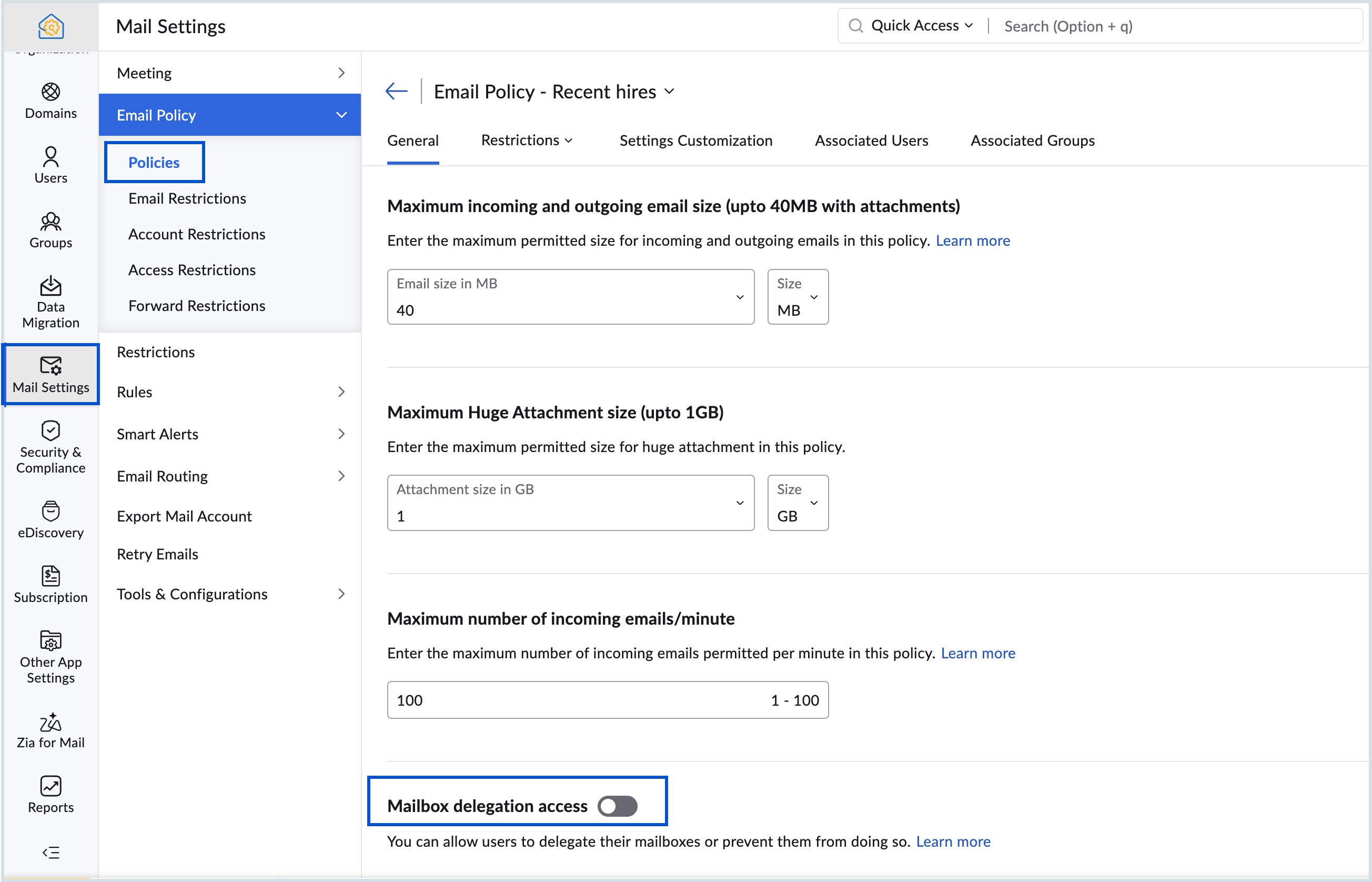
- Go to Mail Settings → Email Policy → Policies.
- Select the policy where you want to manage delegation settings.
- Open General → Mailbox Delegation Access.
- Switch the toggle on or off based on your requirement.
Important Note
If mailbox delegation access is turned off, users will neither be able to assign their mailboxes to others nor access mailboxes shared with them.
Related Articles
Zoho Mail: Streamline your email workflow with mailbox delegation
In today's fast-paced work environment, managing an overflowing email inbox can be a daunting task. The constant influx of messages, important notifications, and requests can easily overwhelm even the most organized individuals. Fortunately, there is ...Introducing Zoho Service Plus : A unified platform for customer service - Early Access for Partners
We are excited to announce early access to Zoho Service Plus, a unified platform that brings together all of our customer service applications into a single platform. The early access program is exclusive only to partners. With Service Plus, manage ...Zoho Mail: Manage All Mailbox Settings in One Place
Hello everyone, Handling daily email needs — like multiple email addresses, employee absence, mailbox sharing, and security control — can be difficult for administrators. The Mailbox Settings section in the Zoho Mail Admin Console makes this easier. ...Zoho CRM : Compliance Made Easy for Email Authentication
We are introducing you with significant updates to enhance email authentication and verification processes across Zoho CRM and other Zoho services. These changes aim to bolster security, ensure compliance with industry standards, and improve user ...Zoho Desk: 2-Year Data Analytics in Zoho Desk
Zoho has announced a much-anticipated feature in Zoho Desk. A select group of users now has early access to the "2-Year Data in Analytics - Reports" feature, allowing them to create reports using data from the past two years. Enhanced Reporting ...