Zoho Mail: Speed Up Your Work with Keyboard Shortcuts
If you spend a lot of time handling emails, moving between your mouse and keyboard can slow you down. Whether you’re replying to clients, cleaning your inbox, or searching for messages, every second matters.
So how can you work faster without constantly switching tools?
Keyboard Shortcuts in Zoho Mail
Keyboard shortcuts help you navigate, compose, and manage emails quickly—without needing to take your hands off the keyboard. They make your email workflow smoother and save time.
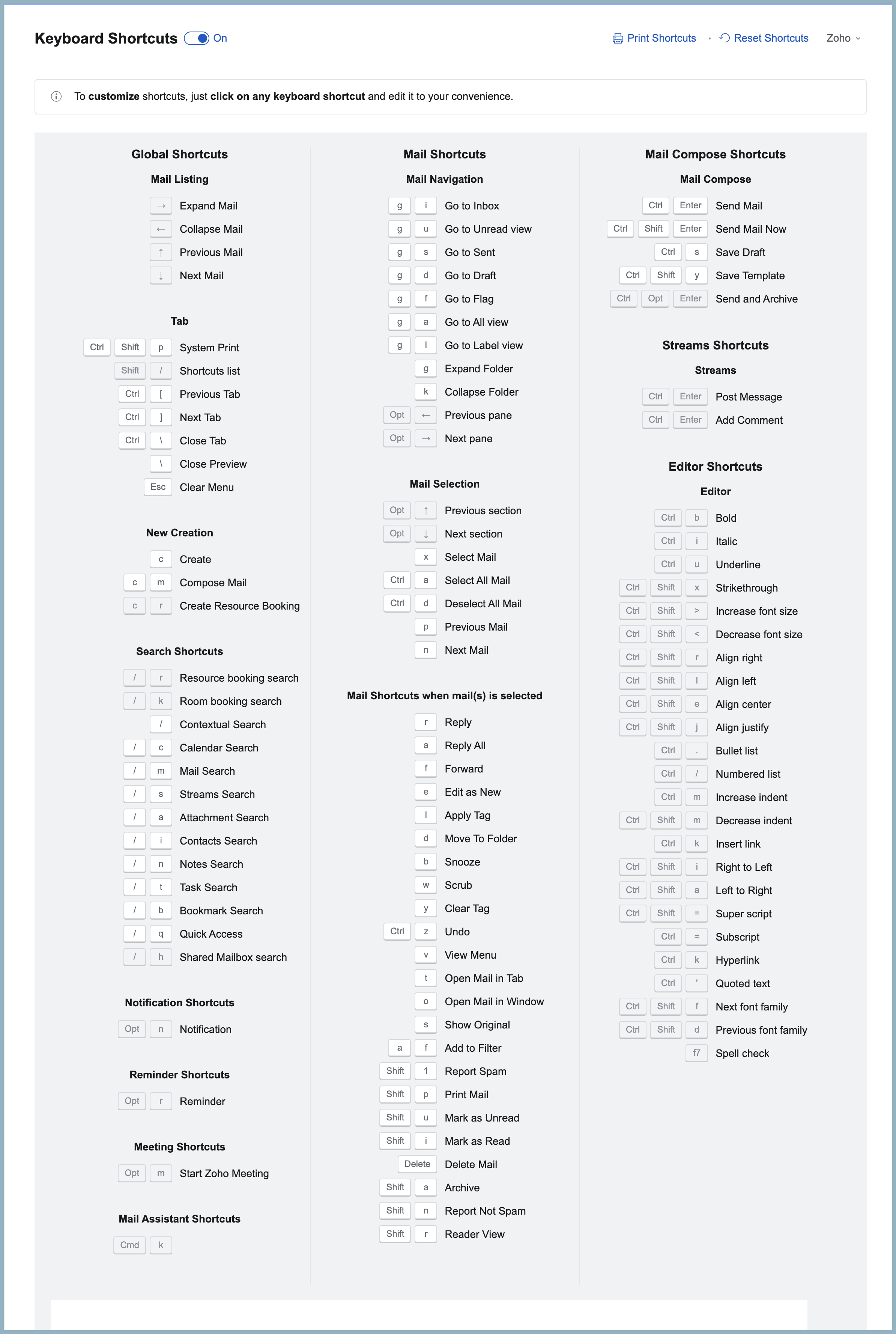
Zoho Mail provides many built-in shortcuts for common actions. You can turn them on or off from the settings, see the full list, and even customize some of them.
How to Access Keyboard Shortcuts
- Log in to your Zoho Mail account.
- Go to Settings > Keyboard Shortcuts.
- You will see a list of shortcuts along with their descriptions.
Some shortcuts appear in bold—these are editable.
- Click on any editable shortcut
- A text box will open
- Enter the shortcut key combination you want
- Click the tick icon to save
Choose a Layout You Already Know
Zoho Mail also allows you to switch to keyboard shortcut layouts used in other popular email services, such as Gmail or Outlook.
Related Articles
Zoho Sheet: Work seamlessly with Sheet's shortcuts
Navigating your worksheets and performing specific actions should be a quick and easy process. That's where keyboard shortcuts come in. Shortcut keys help you accomplish tasks more efficiently, eliminating the need to move away from the keyboard. ...Zoho Mail - a smarter and quicker emailing experience with Zia's OpenAI integration
11Like7234 OpenAI and ChatGPT have taken the world by storm so much that these are household terms now. Zoho, as always, has embraced this new technology with teams coming up with creative ways to make the most of the generative AI capabilities. Zoho ...Zoho CRM : Compliance Made Easy for Email Authentication
We are introducing you with significant updates to enhance email authentication and verification processes across Zoho CRM and other Zoho services. These changes aim to bolster security, ensure compliance with industry standards, and improve user ...Zoho Desk: 2-Year Data Analytics in Zoho Desk
Zoho has announced a much-anticipated feature in Zoho Desk. A select group of users now has early access to the "2-Year Data in Analytics - Reports" feature, allowing them to create reports using data from the past two years. Enhanced Reporting ...Zoho Recruit - Mandatory Assessments for Better Hiring
Zoho announce a significant enhancement to Zoho Recruit’s Candidate Application Form: the Include Assessment option. This feature integrates the pre-screening assessment with the application form fields, ensuring every candidate must complete the ...