Zoho Mail: Handle Mistyped Emails Easily with Catch-All Address
Hello everyone,
Imagine missing an important customer email just because of a tiny typo in the email address.
A missing dot, an extra letter, or the wrong naming format can quietly prevent important conversations from reaching the right person. Customer queries may never reach support, partner replies can go unnoticed, and most of the time, the sender doesn’t even realize something went wrong.
To help organizations avoid these situations, Zoho Mail introduces the Catch-All Address feature—a smart safety net designed to capture emails sent to incorrect or unknown addresses within your domain. Instead of losing those messages, admins can review them, correct the issue, and forward them to the intended recipient.
What is a Catch-All Address?
A catch-all address is a mailbox that receives emails sent to invalid or non-existent addresses within your domain.
Once enabled, emails sent to mistyped or incorrect addresses won’t bounce back to the sender. Instead, they’ll be delivered to the catch-all mailbox.
From there, admins or authorized users can check the email, identify mistakes like spelling errors or wrong naming formats, and send it to the intended person.
For example, if someone sends an email to:
patricia_boyle@zylkertraining.com
instead of:
patricia.boyle@zylkertraining.com
The email will still be received in the catch-all mailbox instead of getting lost.
Key Use Cases
Handle Common Typos
Small mistakes such as missing characters, swapped letters, or wrong separators won’t result in lost communication.
Manage Naming Format Confusion
Emails still arrive even when senders are unsure whether the format is first. last or last. first.
Support Old or Inactive Addresses
Emails sent to outdated aliases or retired email formats can still be received safely.
Protect External Communication
Messages from customers, partners, or vendors with slightly incorrect addresses are still retained.
Improve Security
Since bounce-back messages are avoided, attackers get less information about valid email addresses within the domain.
Why It Matters for Admins
Centralized Visibility
All misdirected emails are collected in one place, making it easier to identify repeated mistakes or patterns.
Fewer Missed Emails
Important communication is preserved, helping businesses maintain responsiveness and customer trust.
Reduced Support Effort
Admins can quickly reroute emails instead of handling multiple follow-ups or resend requests.
Better Spam Control
Eliminating bounce responses reduces the effectiveness of brute-force email discovery attempts.
More Professional Communication
Senders don’t face delivery failures for small mistakes, helping create a more reliable brand experience.
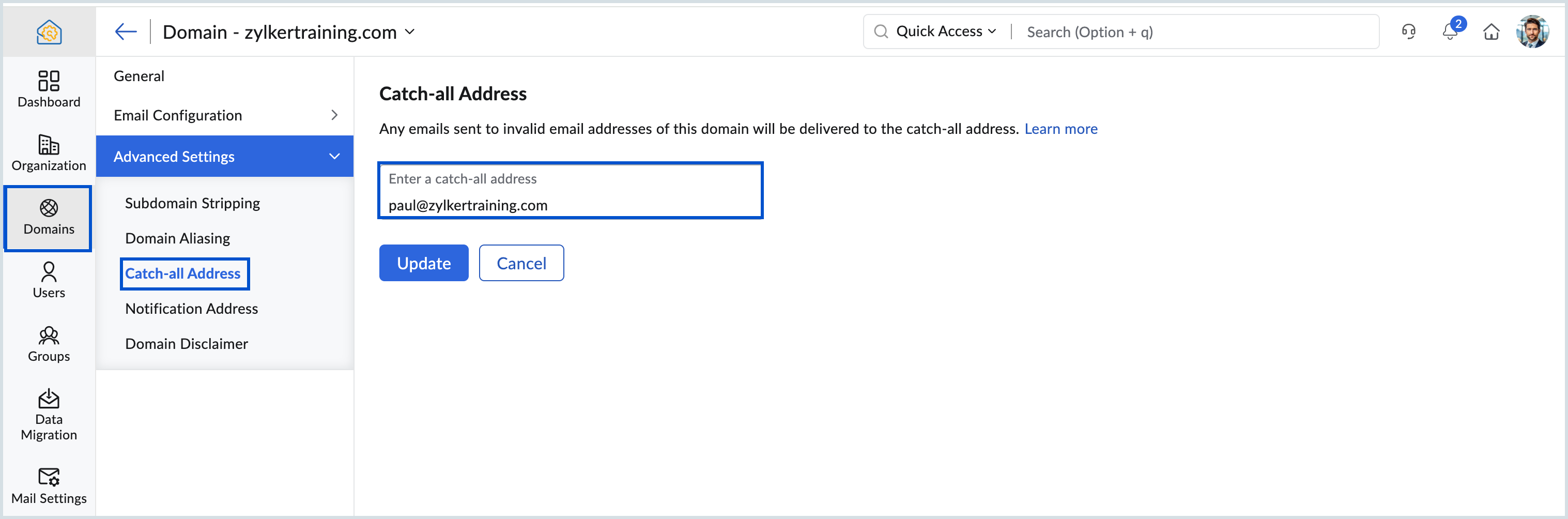
Steps to Configure Catch-All Address in Zoho Mail Admin Console
Before setting up a catch-all address, make sure you already have a valid mailbox or group mailbox available within your organization.
Then follow these steps:
Log in to the Zoho Mail Admin Console
Open Domains from the left-side menu
Select the domain where you want to enable Catch-All Address
Go to Advanced Settings → Catch-All Address
Enter the mailbox or group email address you want to use
Select the preferred mailbox and click Update
This feature helps businesses avoid losing important emails because of simple address mistakes while ensuring smoother and more reliable communication.
Related Articles
Zoho CRM : Compliance Made Easy for Email Authentication
We are introducing you with significant updates to enhance email authentication and verification processes across Zoho CRM and other Zoho services. These changes aim to bolster security, ensure compliance with industry standards, and improve user ...Zoho CRM: The Canvas Record Form for Enhanced Customization
Zoho announced Zoho Crm innovation with Canvas functionality now extends to record forms, enabling you to personalize record entries with the power of Canvas! Enhancing CRM Interactions with CanvasIn the heart of any CRM lies the ability to manage ...Zoho Mail - a smarter and quicker emailing experience with Zia's OpenAI integration
11Like7234 OpenAI and ChatGPT have taken the world by storm so much that these are household terms now. Zoho, as always, has embraced this new technology with teams coming up with creative ways to make the most of the generative AI capabilities. Zoho ...Introducing Zoho Service Plus : A unified platform for customer service - Early Access for Partners
We are excited to announce early access to Zoho Service Plus, a unified platform that brings together all of our customer service applications into a single platform. The early access program is exclusive only to partners. With Service Plus, manage ...Zoho Desk: 2-Year Data Analytics in Zoho Desk
Zoho has announced a much-anticipated feature in Zoho Desk. A select group of users now has early access to the "2-Year Data in Analytics - Reports" feature, allowing them to create reports using data from the past two years. Enhanced Reporting ...