Zoho Mail: Build a Custom Login Experience with White Labeling
Hello everyone,
When users open their email login page, the first thing they notice is the URL. If it looks generic, it may not match your organization’s brand—especially if you have already built a strong identity.
For admins, giving users a familiar and professional login page is a simple way to build trust and improve the overall experience.
What is the White Labeling Feature?
White Labeling in Zoho Mail allows administrators to replace the default login URL with a custom one based on their own domain.
For example, instead of a standard Zoho login link, you can use something like:
mail.yourdomain.com
This makes the login page feel like a natural part of your organization instead of a third-party service.
Key Use Cases
Client-Facing Businesses
Using a branded login link helps maintain a professional image and builds trust with clients. It keeps your communication consistent with your brand.
Large Team Deployments
When rolling out email access to many users, a custom login page makes the process easier. Employees feel more comfortable using a familiar-looking URL.
Why It Matters for Admins
Brand Consistency
A custom login URL strengthens your brand and creates a more connected experience for users.
Better User Experience
A simple, branded URL is easier to remember and reduces confusion for users. This can also lower the number of support requests.
Secure Access
Admins can generate a security certificate from the Admin Console, ensuring the custom login URL is safe and protects user data.
Steps to Set Up White Labeling
Follow these basic steps to configure your custom login URL:
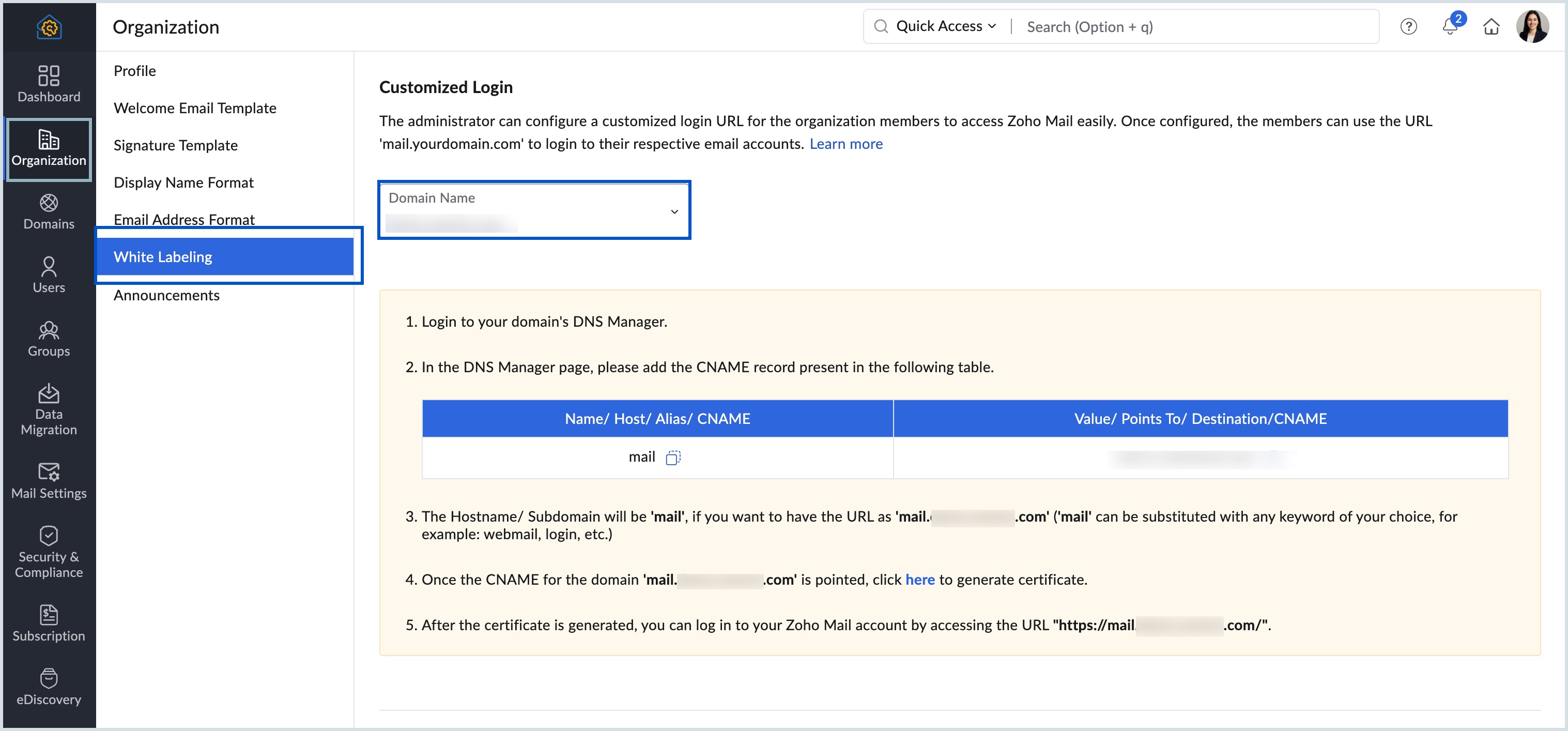
1.Go to the White Labeling section in the Zoho Mail Admin Console and copy the CNAME value
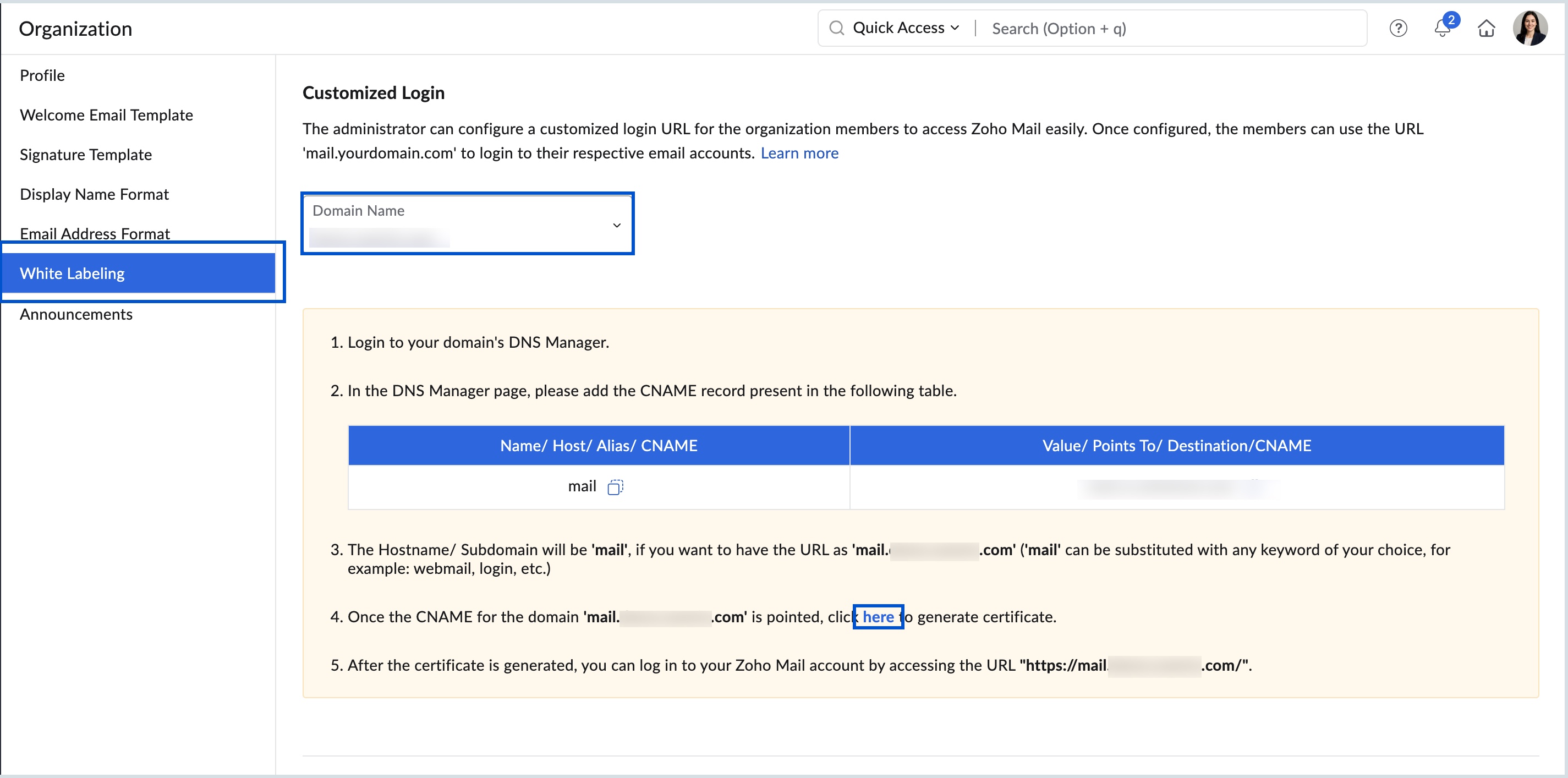
3.Generate a certificate from the Zoho Mail Admin Console
4. After setup, your users will be able to access email through your branded login link.
Final Note
White Labeling is a simple but powerful way to improve your organization’s email experience.
By using a custom login URL, you can make your brand more visible, improve user trust, and provide a smoother login process for everyone.
Related Articles
Zoho CRM: The Canvas Record Form for Enhanced Customization
Zoho announced Zoho Crm innovation with Canvas functionality now extends to record forms, enabling you to personalize record entries with the power of Canvas! Enhancing CRM Interactions with CanvasIn the heart of any CRM lies the ability to manage ...Zoho CRM : Compliance Made Easy for Email Authentication
We are introducing you with significant updates to enhance email authentication and verification processes across Zoho CRM and other Zoho services. These changes aim to bolster security, ensure compliance with industry standards, and improve user ...Zoho Mail - a smarter and quicker emailing experience with Zia's OpenAI integration
11Like7234 OpenAI and ChatGPT have taken the world by storm so much that these are household terms now. Zoho, as always, has embraced this new technology with teams coming up with creative ways to make the most of the generative AI capabilities. Zoho ...Zoho Analytics: Product Updates - November 2023
Hello partners, We're excited to announce some key updates this month to improve your customers' BI experience. Here's a rundown of the new features. Advanced Analytics for Jotform Advanced Analytics for Jotform enables you to understand the ...Zoho Analytics 6.0 Beta: A New Era in Data Analytics
Zoho has introduced Zoho Analytics 6.0 Beta, a significant upgrade tailored to the diverse needs of business users, data analysts, data engineers, and data scientists. This version incorporates extensive user and market feedback, offering innovative ...