Zoho FSM: Multi-Asset Support Now Available Across Work Orders, Estimates & Service Appointments
Hello everyone!
Zoho introduced an important enhancement that is now available in FSM:
You can now add multiple assets to Work Orders, Estimates, and Service Appointments.
This update makes field service operations clearer, more flexible, and better organized — especially for teams that handle multiple assets during a single customer visit.
Why Multi-Asset Support Matters
Many service teams work in locations where technicians need to service more than one asset —
like multiple AC units in a home, several appliances, or different machines in a factory.
Earlier, only one asset could be linked to a Work Order, Estimate, or Service Appointment.
Now, that limitation is removed.
What Has Changed?
A new transaction setting called “Asset on Service Line Items” has been introduced.
After enabling this setting, you can do the following:
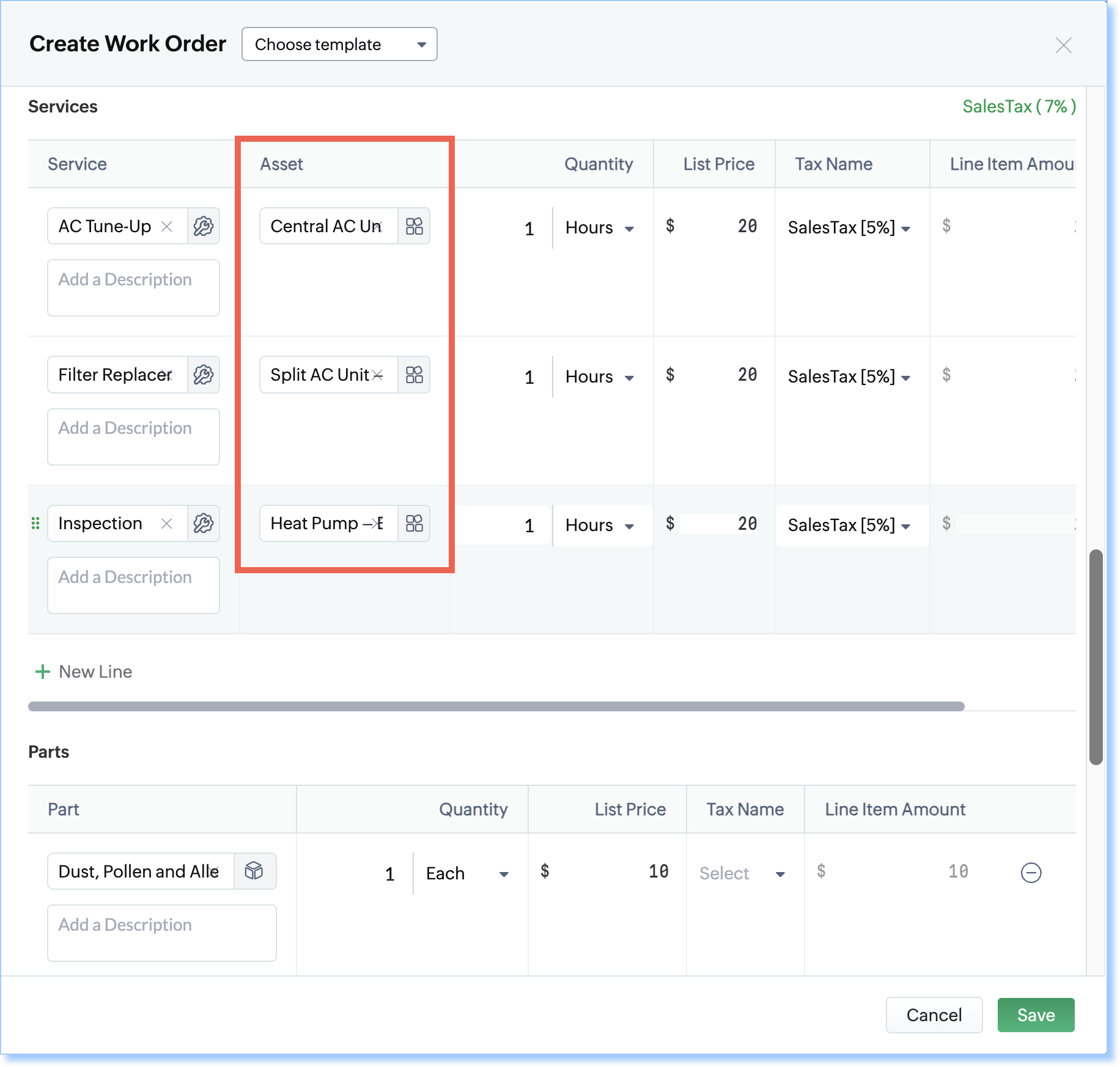
1. Select an Asset for Each Service Line Item
Every service line item in Work Orders, Estimates, or Service Appointments can be connected to a specific asset.
2. Better Asset History & Tracking
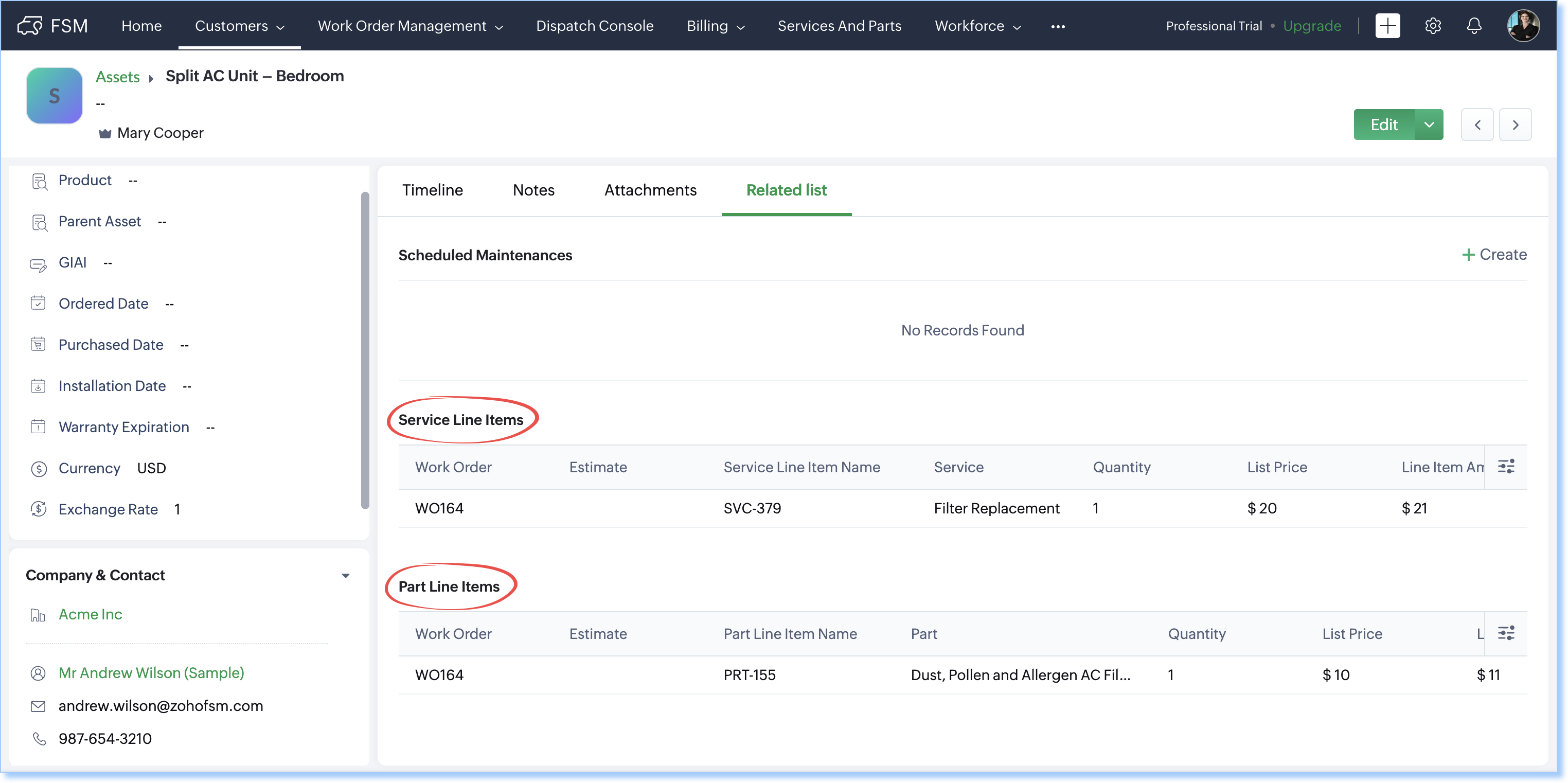
Each asset record will now show complete details:
Service Line Items related list → displays every service done on that asset.
Part Line Items related list → shows the parts used for each service.
Example
Service Name | Asset |
AC Tune-Up | Central AC Unit – Living Room |
Filter Replacement | Split AC Unit – Bedroom |
Inspection | Heat Pump – Basement |
With Multi-Asset Support:
All three services can be added to a single work order.
Each service (Tune-Up, Filter Replacement, Inspection) can be linked to the correct asset.
Any parts used will also be automatically connected to the right asset.
This makes the asset’s history more accurate and more helpful for future service visits.
Related Articles
Introducing Zoho Service Plus : A unified platform for customer service - Early Access for Partners
We are excited to announce early access to Zoho Service Plus, a unified platform that brings together all of our customer service applications into a single platform. The early access program is exclusive only to partners. With Service Plus, manage ...Zoho CRM : Compliance Made Easy for Email Authentication
We are introducing you with significant updates to enhance email authentication and verification processes across Zoho CRM and other Zoho services. These changes aim to bolster security, ensure compliance with industry standards, and improve user ...Zoho FSM: Connecting Your Service and Finance Teams
In field service, the highest cost isn’t just fuel or travel time — it’s the delay between completing a job and receiving payment. Zoho FSM, powered by Zoho Invoice, helps you close that gap by simplifying and automating your billing process. Faster, ...Zoho FSM Extension for Zoho CRM: Synergize Your Sales and Service Teams
The Zoho FSM for Zoho CRM is an extension that augments the utility of Zoho FSM and Zoho CRM and enables the sales and service teams to work closely. It is another significant addition to the diverse feature set offered by Zoho FSM. Read on to find ...Zoho CRM: The Canvas Record Form for Enhanced Customization
Zoho announced Zoho Crm innovation with Canvas functionality now extends to record forms, enabling you to personalize record entries with the power of Canvas! Enhancing CRM Interactions with CanvasIn the heart of any CRM lies the ability to manage ...