Zoho CRM Kiosk Studio Upgrade: Launch Anywhere, Capture Data Instantly
Great news for Zoho CRM users!
Kiosk Studio has received a powerful set of upgrades designed to make your workflows faster, smarter, and far more flexible. From launching kiosks anywhere in CRM to capturing data live during execution, these enhancements are all about reducing friction and boosting productivity.
Let’s walk through what’s new 👇
Open Kiosks Anywhere with Client Script Support (Phase 1)
For the first time, Kiosks can now be launched from anywhere inside Zoho CRM using Client Scripts.
This update introduces a Unified API Name — a single, consistent identifier for every version of a Kiosk. This makes Kiosk management cleaner and script integrations smoother across your CRM.
How to launch a Kiosk using Client Scripts:
- Go to Settings → Developer Hub → Client Script → Command
- Create a command to open a Kiosk
- Launch it instantly using the Command Palette or keyboard shortcuts — from any module
This is just Phase 1, and it sets the stage for much deeper scripting capabilities.
What’s coming next:
- Add client scripts directly to Kiosk screens
- Attach multiple scripts to a single screen
- Trigger callback functions using Kiosk responses
Create Records Live While the Kiosk Is Running
Record creation in Kiosk Studio just became dramatically simpler and more dynamic.
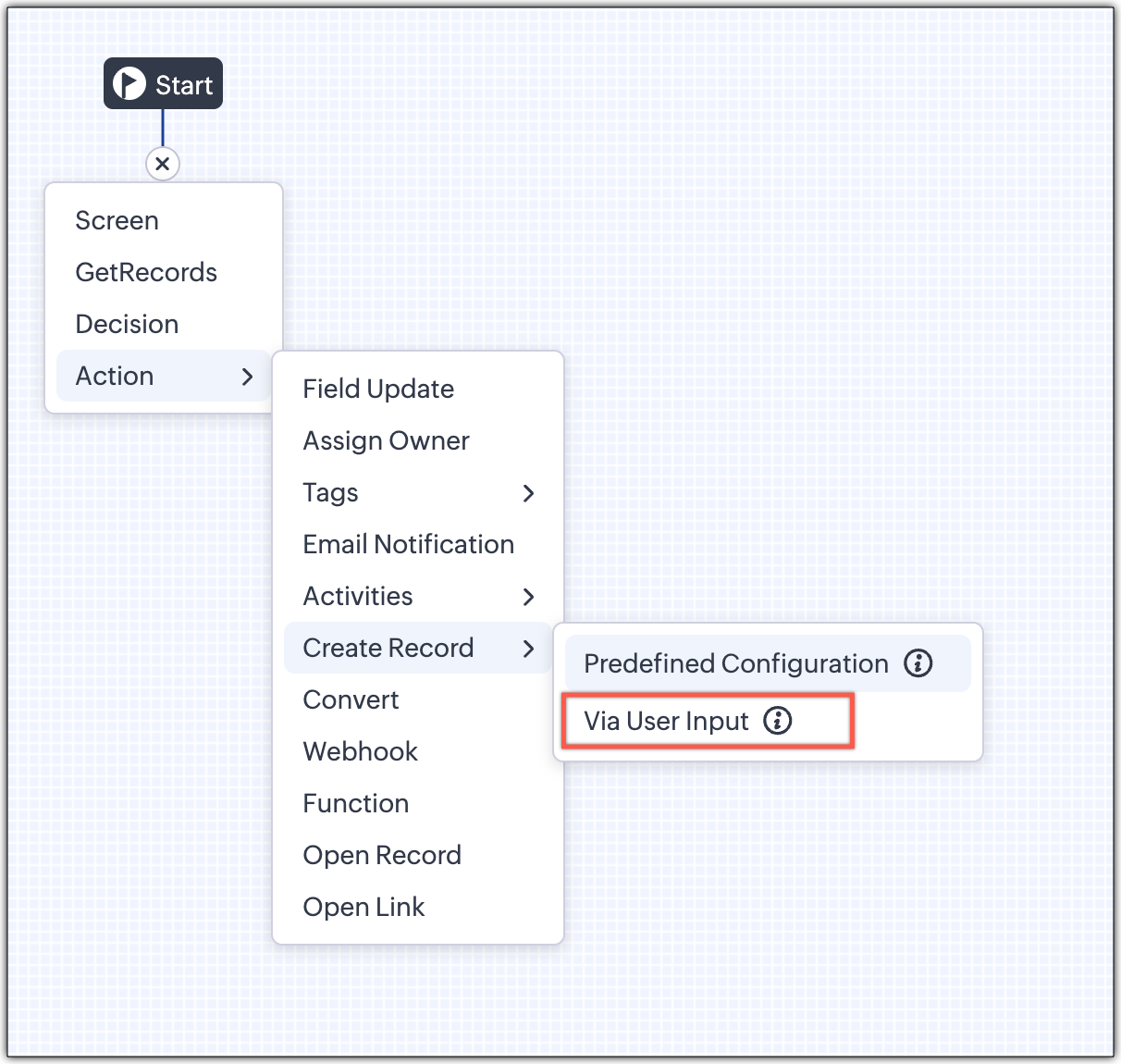
1️⃣ Predefined Configuration (Existing Option)
Previously available record creation is still here—now renamed Predefined Configuration.
It automatically creates records using predefined values (static or from earlier screens). Ideal for repetitive or predictable processes.
It automatically creates records using predefined values (static or from earlier screens). Ideal for repetitive or predictable processes.
2️⃣ Via User Input (Brand New ✨)
This is the real game-changer.
Earlier, admins had to:
- Manually recreate module fields in Kiosk screens
- Map every field one by one
- Update kiosks whenever module fields changed
Now? That’s history.
With Via User Input, records can be created in real time using a Quick Create pop-up during Kiosk execution—no field replication, no complex mapping.
How it works:
- Choose Create Record → Via User Input
- Select the module and layout
- Optionally prefill common fields
- During execution, users enter data directly in the Quick Create form
If a user doesn’t have create permission, the step is skipped automatically.
Real-world use cases:
- A sales rep books a demo while on a live call
- A support agent logs a case while speaking to a customer
- Contact details are updated instantly—no follow-ups required
Everything happens in the moment, exactly when the data becomes available.
GetRecords Screens Are Smarter Than Ever
Managing records inside Kiosks just got a serious upgrade.
What’s improved:
- Fetch all records from a module (not just limited selections)
- Pagination for easy navigation through large datasets
- Search and filters to find records faster
- The selection limit increased from 10 to 100 records
- Instant first-screen loading — no refresh button needed
No matter where you launch a Kiosk from (Home, Canvas, Blueprint, Record View, or Custom Button), GetRecords now loads instantly.
A sales rep books a demo while on a live call
A support agent logs a case while speaking to a customer
Contact details are updated instantly—no follow-ups required
Fetch all records from a module (not just limited selections)
Pagination for easy navigation through large datasets
Search and filters to find records faster
The selection limit increased from 10 to 100 records
Instant first-screen loading — no refresh button needed
Take a look at the GIF below to understand how this action can be set up and executed.

Kiosk Studio Now Available in the Standard Edition Kiosk creation is no longer limited to higher plans.
It’s now available across all paid Zoho CRM editions, making automation accessible to more teams than ever.

New pagination making easier to navigate records
Zoho have added pagination to the GetRecords screen, making it easier to navigate and locate specific records quickly, even when dealing with large data sets.

Search or filter records in the GetRecord screens
Quickly find records in the etRecords screens with this new addition to the Kiosk.

Increased the selection limit to select more records
Zoho have increased the GetRecord selection limit from 10 to 100.

GetRecords First-Screen Loads Instantly - No Refresh Needed
Currently, only Kiosks opened through user actions (like Blueprint or Custom Buttons) load records directly, while others show a 'Refresh to load' button.

Now, every Kiosk auto-loads the first screen of GetRecords without the need to refresh manually. When a Kiosk opens with GetRecords on the first screen, records now load instantly, regardless of whether it’s on the Home Page, Canvas, Record Detail View, Blueprint, or a Custom Button.

Kiosk Studio Added to the Standard Edition
We have extended the ability to create Kiosks to all paid editions in Zoho CRM, including the Standard Edition. zoho aim to allow more users to create and manage Kiosks for their business processes. Refer to the table below to determine the kiosk creation limits for each Zoho CRM edition.
Standard | Professional | Enterprise | Ultimate / CRMPlus / ZohoOne | |
Number of Kiosks | 2 | 7 | 25 | 50 |
Final Thoughts
These enhancements transform Kiosk Studio into a faster, more flexible, and real-time data capture powerhouse. Whether you’re streamlining sales calls, support workflows, or internal processes, Kiosks are now easier to build, smarter to run, and more powerful to scale.
Start exploring the new Kiosk Studio today—and keep an eye out. There’s more innovation coming soon
For more details, visit pfc-group.com.
Related Articles
Zoho CRM: The Canvas Record Form for Enhanced Customization
Zoho announced Zoho Crm innovation with Canvas functionality now extends to record forms, enabling you to personalize record entries with the power of Canvas! Enhancing CRM Interactions with CanvasIn the heart of any CRM lies the ability to manage ...Zoho Analytics 6.0 Beta: A New Era in Data Analytics
Zoho has introduced Zoho Analytics 6.0 Beta, a significant upgrade tailored to the diverse needs of business users, data analysts, data engineers, and data scientists. This version incorporates extensive user and market feedback, offering innovative ...Zoho CRM: New Assignment Rules
Zoho CRM is introducing a new feature to make assignment rules even more flexible and powerful. Administrators can now automate the assignment of records based on specific criteria. These criteria can be related to the fields in the record or the ...Introducing Zoho Service Plus : A unified platform for customer service - Early Access for Partners
We are excited to announce early access to Zoho Service Plus, a unified platform that brings together all of our customer service applications into a single platform. The early access program is exclusive only to partners. With Service Plus, manage ...Zoho CRM Gets Smarter: Introducing VoC in Kiosk Studio for Better Call Operations
Dear Customers, We hope this message finds you well! Zoho first introduced Voice of the Customer (VoC) for Zoho CRM, our goal was clear—understand what your customers are truly saying. Over the past few years, VoC has matured from just collecting ...