Zoho CRM: Improves Sales Forecasting with Custom Columns
Availability
Release Plan: Rolling out in phases. Currently enabled for JP DC.
Supported Editions: Enterprise Edition and above.
Hello everyone,
Forecasting inside Zoho CRM helps sales teams, managers, and business leaders monitor performance and prepare for future revenue opportunities.
While standard forecast metrics such as:
Target Amount
Achieved Revenue
Pipeline Amount
Provide foundational forecasting insights, many businesses require additional custom KPIs that better reflect their unique sales strategy and operational goals.
For example, organizations may want visibility into:
Pipeline coverage ratios
Stretch targets
Probable revenue projections
Team-specific sales KPIs
Custom performance benchmarks
Since these metrics vary across organizations, Zoho CRM now introduces Custom Columns in Forecasts, allowing businesses to configure and track custom forecasting metrics directly inside forecast views.
This enhancement improves forecasting flexibility, performance visibility, and sales planning accuracy.
Custom Columns allow forecast managers to add business-specific metrics directly into forecast reports.
Each forecast group can support up to two custom columns.
Supported Column Types
Formula Column
Import Column
Among the two configured columns:
Only one can be a Formula Column
One or both can be Import Columns
Formula Column
Use Case for Sales Representatives
Sales representatives often need quick visibility into whether their current pipeline is sufficient to achieve assigned targets.
Instead of manually calculating ratios, forecast managers can create Formula Columns that automatically calculate performance metrics.
Example: Pipeline Coverage Ratio
Pipeline Coverage Ratio=TargetPipeline Amount
This helps sales teams instantly understand:
Whether pipeline value supports quota achievement
Which opportunities require prioritization
Potential forecast gaps
Overall sales readiness
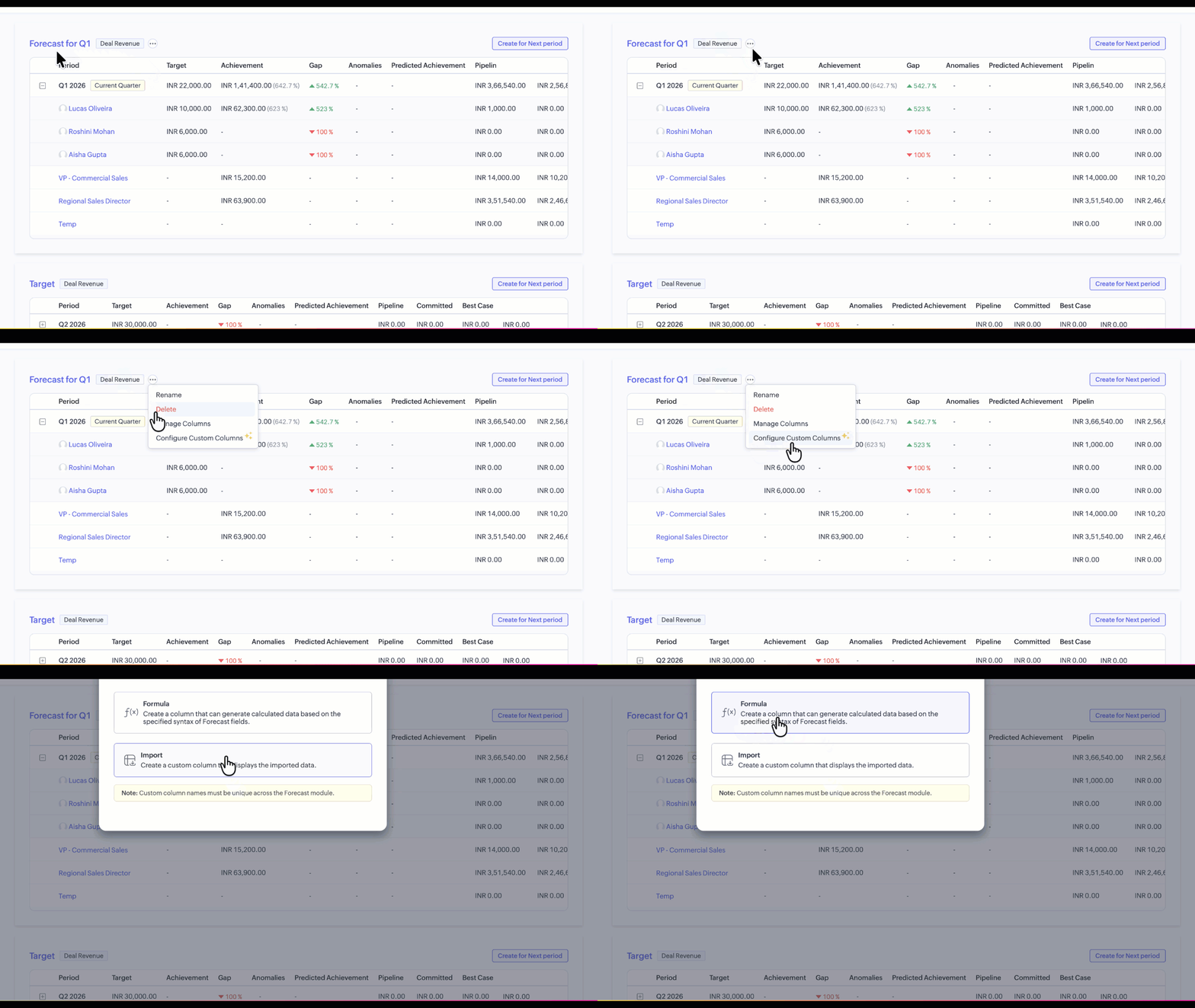
How to configure a Formula Column
Forecast managers can configure Formula Columns using the following steps:
Click More Options beside the Forecast Group
Select Configure Custom Column
Choose Formula Column
Define the required formula syntax
Save the configuration
After setup, formula values populate automatically throughout the forecast view.
Use Case for Managers and Stakeholders
Organizations often maintain additional forecasting targets outside CRM.
For example:
A sales manager may define a Stretch Goal that exceeds the standard forecast target to motivate teams toward higher performance.
Since these values may change periodically or exist in external planning documents, Import Columns allow businesses to bring those metrics directly into CRM forecasts.
This enables leadership teams to compare:
Standard forecast targets
Actual sales performance
Stretch goals
Additional business KPIs
from a single forecasting interface.
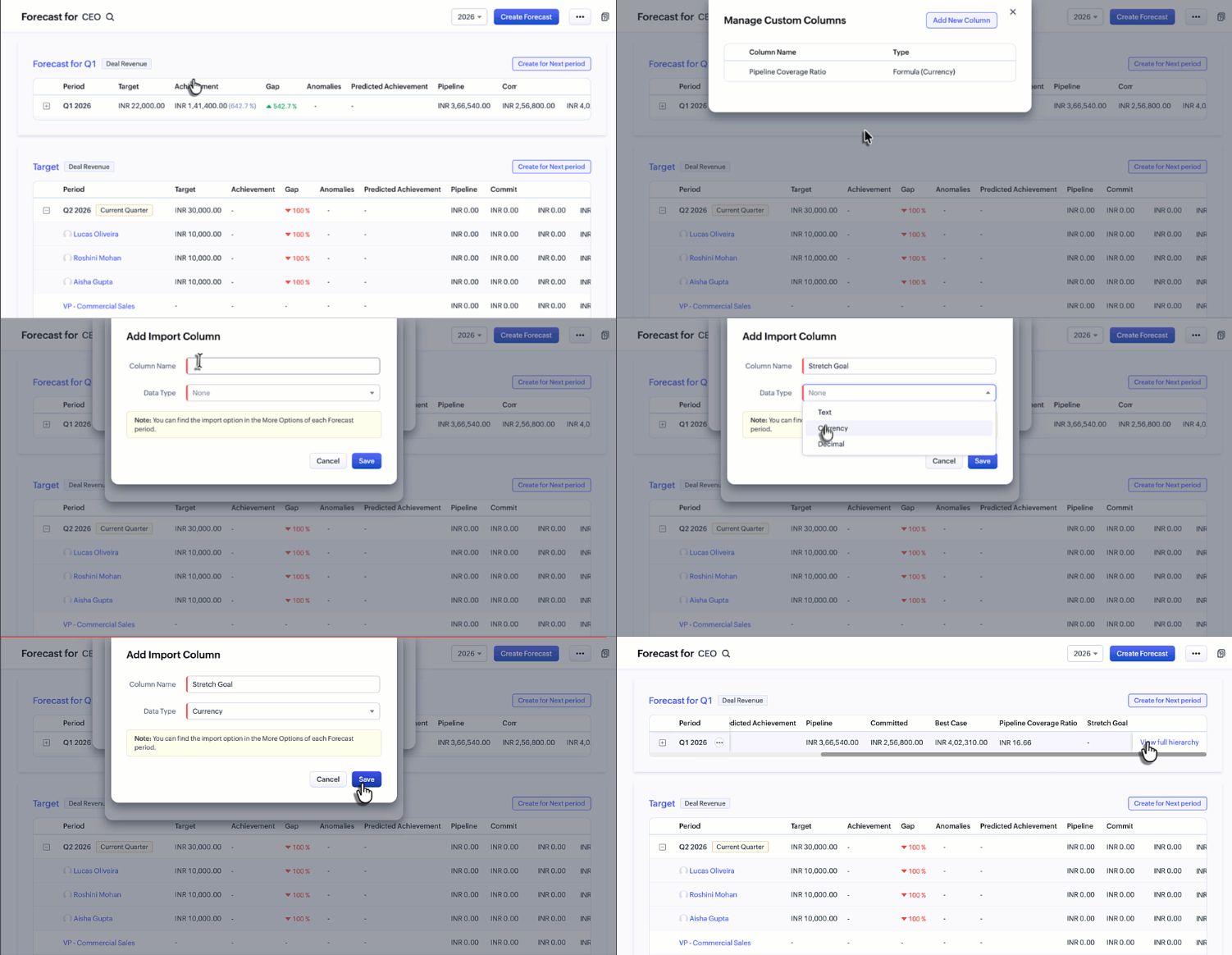
How to configure an Import Column
To configure Import Columns:
- Create an Import Column from Custom Column settings
- Open More Options for a specific forecast period
- Select Import Custom Column Data
- Export the provided sample file
- Add required values
- Re-import the file into CRM
Once imported, the data becomes visible directly inside the forecast.
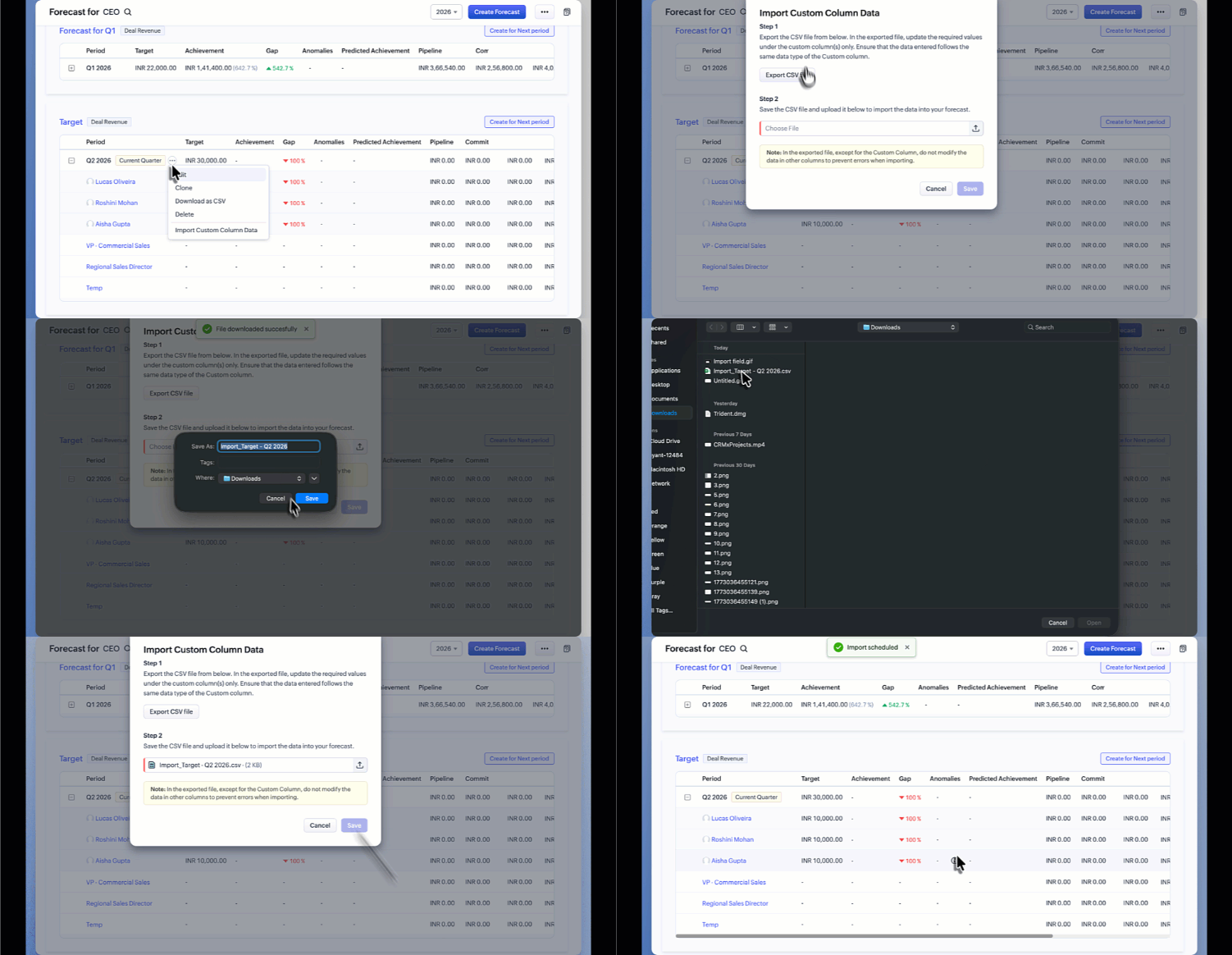
The imported data will then be reflected within the forecast.
Visibility Across Forecast Views
Configured custom columns appear across both major forecasting interfaces:
- Forecast List View
- Breadcrumb View
This allows users to seamlessly review both standard and custom forecasting metrics while navigating forecast hierarchies.
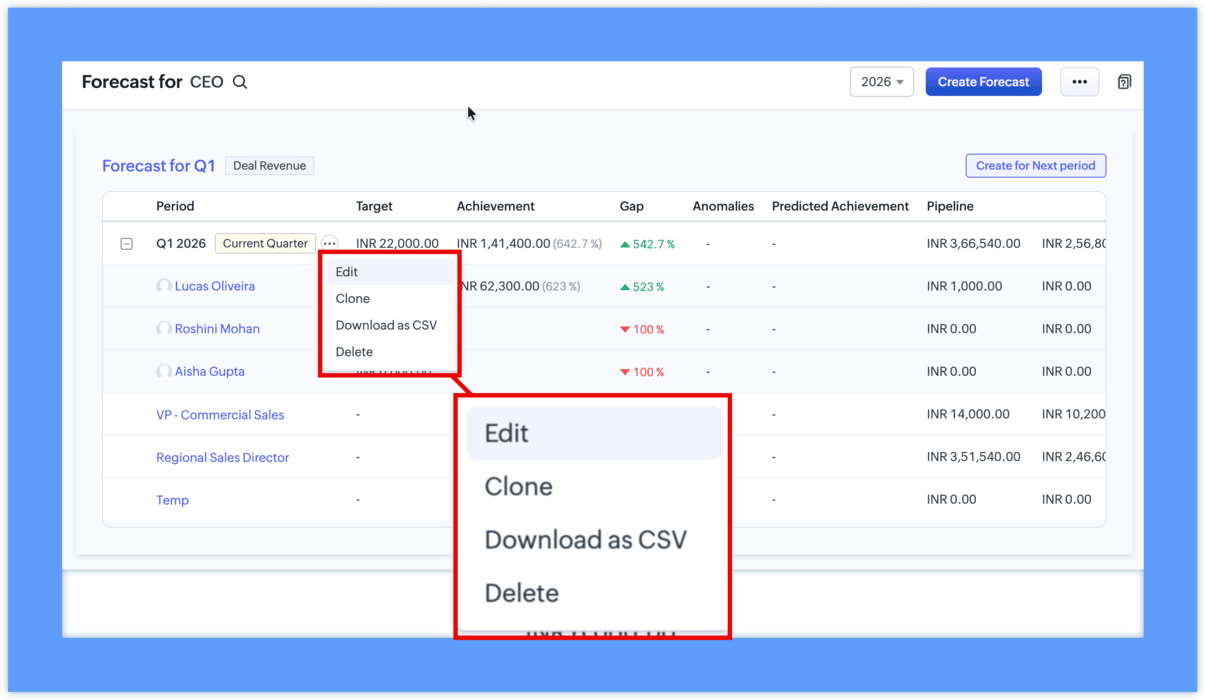
Forecast-Level Column Management
Previously, column management options were available only at the module level.
With this update, forecast managers can now configure columns individually for each forecast.
Additional improvements include:
- Forecast-specific column management
- Custom column arrangement based on reporting priority
- Independent forecast customization
- CSV export support for forecasts
This gives sales operations teams greater flexibility when building customized forecasting environments.
Why this update matters
Forecasting requirements vary significantly across organizations, and standard sales metrics are often not enough for strategic planning.
With Custom Columns in Forecasts, businesses can now:
Track organization-specific KPIs
Improve forecast visibility
Align forecasting with business goals
Reduce dependency on spreadsheets
Build more meaningful sales reports
Improve revenue planning accuracy
By bringing customized forecasting metrics directly into Zoho CRM, organizations can create a more flexible and data-driven sales forecasting process.
For more information, please visit www.pfc-group.com.
Related Articles
Zoho CRM: The Canvas Record Form for Enhanced Customization
Zoho announced Zoho Crm innovation with Canvas functionality now extends to record forms, enabling you to personalize record entries with the power of Canvas! Enhancing CRM Interactions with CanvasIn the heart of any CRM lies the ability to manage ...Rebrand your CRM with the all-new custom domain mapping setup
This is a game changer as this potentially allows every organization to rebrand their CRM system and align it with the domain name of their business. Note: This feature is currently in the Early Access mode. To request access to this feature please ...Zoho CRM: Global Sets
Hello all, We are thrilled to announce Global picklists, a much awaited feature for CRM Admins! As administrators who implement and manage CRM solutions, you may have dealt with picklists that are present across multiple modules and have the same ...Zoho CRM: Introducing Rollup summary
Hello All, We hope you're well! We're here with an exciting update that goes right into CRM's core capabilities. It's called the Rollup summary. Let's go! Your CRM is a vast database with well-connected data sources, where you can access both the ...Zoho CRM : Compliance Made Easy for Email Authentication
We are introducing you with significant updates to enhance email authentication and verification processes across Zoho CRM and other Zoho services. These changes aim to bolster security, ensure compliance with industry standards, and improve user ...