Zoho CRM: Dynamic filters for lookup fields
we're thrilled to share our latest additions to lookup filters: introducing dynamic filter criteria.
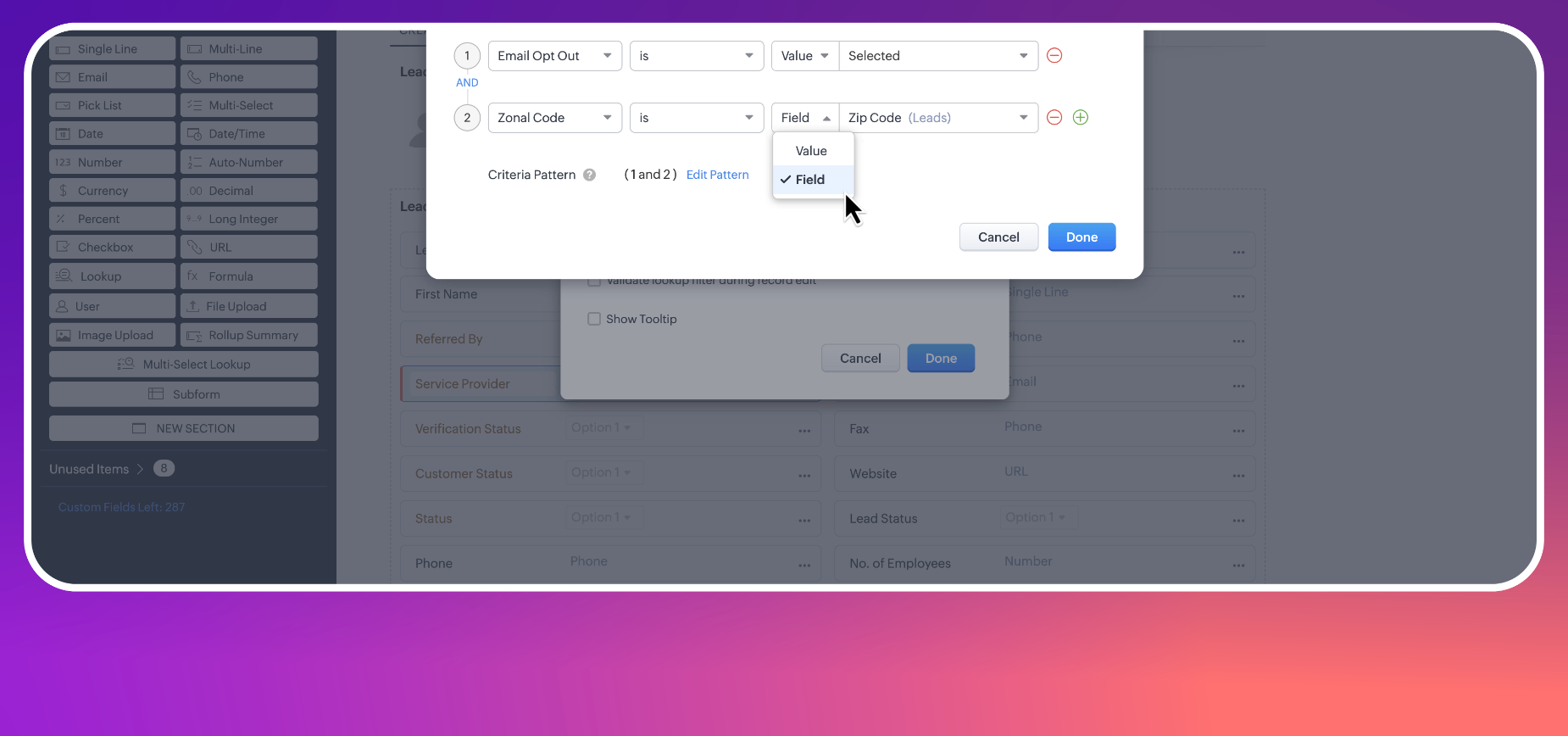
Picture this scenario where a sales manager is finalizing a complex deal and needs to involve a subject matter expert (SME) for extra support. Using the current lookup filter tool, they can narrow down the options to active SMEs, streamlining the process and saving time.
However, it would be more efficient if the available SMEs were listed based on their service expertise or technical handling required for the deal. This is where traditional lookup filters fall short.
Enter dynamic filters for lookup fields!
- Dynamic filters enhance the lookup functionality by adapting in real-time to the data you're working with. Once configured, dynamic lookup filters change the lookup results based on the field values in the current module. This means the filters compare fields in the lookup module with those in the current module.
So, using our example, you can create a dynamic lookup filter to assign SMEs or Service Experts to deals, where the lookup search will display results only when the Service Expertise matches the Service Requiremets of the deal.
- Additionally, for lookups in a subform, users can filter records by doing field-to-field comparisons with fields in both the layout and the subform itself.
Consider another scenario where a sales team associates a vendor in the Vendor Details subform within the Dealsmodule. Using dynamic filter functionality, vendors can be displayed based on the industry type of the customer for whom the deal is being created. This ensures that the lookup search is precisely tailored to the customer's industry type, enhancing relevance and minimizing erroneous vendor associations.
Key Highlights
- Tailored data views: Dynamic filters offer a more targeted approach to data association, avoiding information overload.
- Enhanced relevance: By automatically adjusting to the current record’s context, dynamic filters save time and minimize data entry errors.
Related Articles
Zoho CRM: The Canvas Record Form for Enhanced Customization
Zoho announced Zoho Crm innovation with Canvas functionality now extends to record forms, enabling you to personalize record entries with the power of Canvas! Enhancing CRM Interactions with CanvasIn the heart of any CRM lies the ability to manage ...Zoho CRM Update: Filter Records Using Lookup Module Fields in Custom Views and Advanced Filters
Hello everyone, Zoho CRM now allows you to filter records more smartly by using fields from related (lookup) modules. This update helps you manage and analyze your data more effectively. With this feature, you can now apply filters using lookup ...Zoho CRM: New Assignment Rules
Zoho CRM is introducing a new feature to make assignment rules even more flexible and powerful. Administrators can now automate the assignment of records based on specific criteria. These criteria can be related to the fields in the record or the ...Zoho CRM Mobile Updates: Lookup Filters, Approval Recall, Multi-Select Lookup, Canvas Tag Support & More
Hello everyone, Zoho introduced some useful updates to the Zoho CRM mobile apps to improve your everyday experience. Here’s a quick look at what’s new: Filters for Lookup (Android) When you tap on a lookup field like “Contact Name,” you usually see a ...Zoho CRM: Global Sets
Hello all, We are thrilled to announce Global picklists, a much awaited feature for CRM Admins! As administrators who implement and manage CRM solutions, you may have dealt with picklists that are present across multiple modules and have the same ...