Zoho Creator BYOC Feature: Greater Control, Better Performance
- Quick Connect (Default): Uses Zoho-managed OAuth credentials
- Custom (BYOC): Uses your own OAuth credentials from third-party services
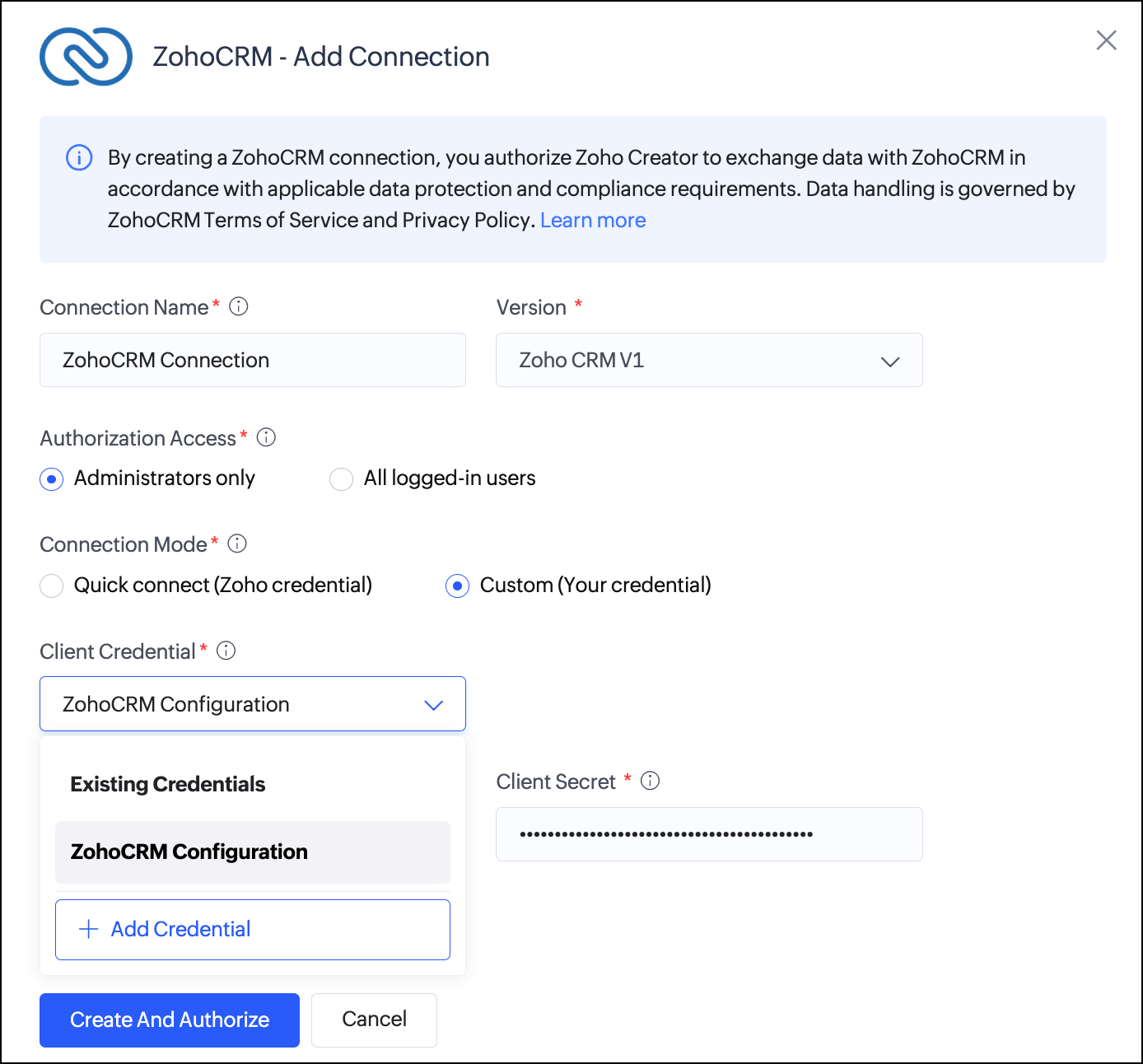
How It Works
Select the Custom (BYOC) option while creating a connection
Enter authentication details such as Client ID, Client Secret, and other required parameters
Complete authorization to grant access to your account
Note:
Required credentials may differ depending on the service
Multiple credentials can be stored and reused across connections
Updating credentials may require re-authorization for dependent connections
Applicable for both Admin and user-level authorizations
Existing connections remain unchanged
Why This Matters
Independent API Limits
Avoid shared rate limits by using your own OAuth app to ensure better performance and reliability.
Stronger Security Control
Maintain full ownership and control over authentication credentials and access.
Improved Compliance
Align integrations with internal policies and regulatory standards.
Better Scalability
Reuse credentials across multiple integrations for efficient management.
BYOC vs Custom Connectors
BYOC for Built-in Connectors: Use your own OAuth credentials with pre-configured integrations provided by Zoho Creator
Custom Connectors: Build integrations for services not available by default, with support for multiple authentication methods such as API keys, OAuth, and more
Availability
Available for all built-in connectors in Zoho Creator (C6)
Available on the Zoho Creator Developer Platform
In C5, limited to connectors with Datasources support
Rolled out globally across all data centers from March 23, 2026
Existing connections will continue to function using the Quick Connect model.
What’s Next
Zoho plans to extend BYOC capabilities to custom connectors in future updates, further enhancing flexibility in integrations.
Final Note
This update empowers businesses with greater control, flexibility, and scalability in managing integrations within Zoho Creator. We encourage you to explore this feature and share your feedback.
Related Articles
Zoho Creator Upcoming Updates — May 2023
Hello everyone! We're back with more monthly updates after a short hiatus. During that time, we've been hard at work improving the user experience and adding new features to our platform. Today, we're pleased to announce a wide range of fascinating ...Zoho Desk: 2-Year Data Analytics in Zoho Desk
Zoho has announced a much-anticipated feature in Zoho Desk. A select group of users now has early access to the "2-Year Data in Analytics - Reports" feature, allowing them to create reports using data from the past two years. Enhanced Reporting ...Zoho Creator: Better App Sharing and License Control
Hello everyone, Zoho introduced new enhancements in the Zoho Creator Developer Console. These updates strengthen private app distribution with improved licensing controls and introduce environment support for installed apps — enabling safer testing ...Zoho Recruit - Mandatory Assessments for Better Hiring
Zoho announce a significant enhancement to Zoho Recruit’s Candidate Application Form: the Include Assessment option. This feature integrates the pre-screening assessment with the application form fields, ensuring every candidate must complete the ...Introducing Zoho Service Plus : A unified platform for customer service - Early Access for Partners
We are excited to announce early access to Zoho Service Plus, a unified platform that brings together all of our customer service applications into a single platform. The early access program is exclusive only to partners. With Service Plus, manage ...