Zoho Cliq 6.0: Faster Performance for Smarter Workflows

Zoho announced updates to improve how you manage skills and secure your data views. These enhancements include a revamped Skill Set interface and added flexibility for managing and protecting custom views.
Skill Set Interface Revamp
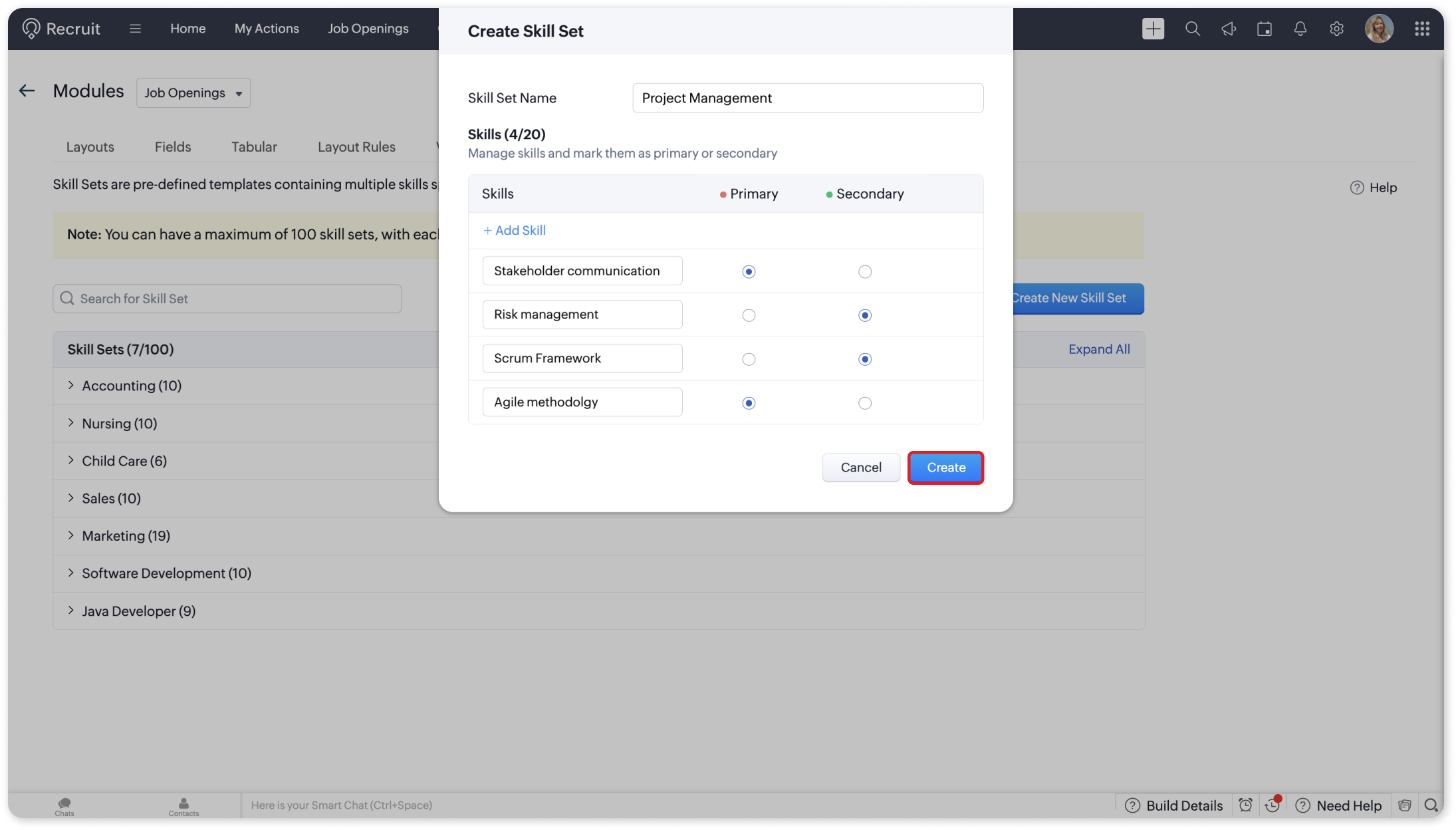
The Skill Set feature in Zoho Recruit now boasts a redesigned interface for a cleaner, more intuitive experience. Here’s what’s new:
Streamlined Skill Organization
Custom View Improvements
Zoho also made significant updates to Custom Views, enabling better data management and added security features.
Custom View Descriptions
You can now include a description when creating a custom view. This addition is particularly helpful for teams, as it provides context about the view's purpose. Clear descriptions allow team members to understand the criteria and intended use of the view at a glance, minimizing confusion or the need for clarifications.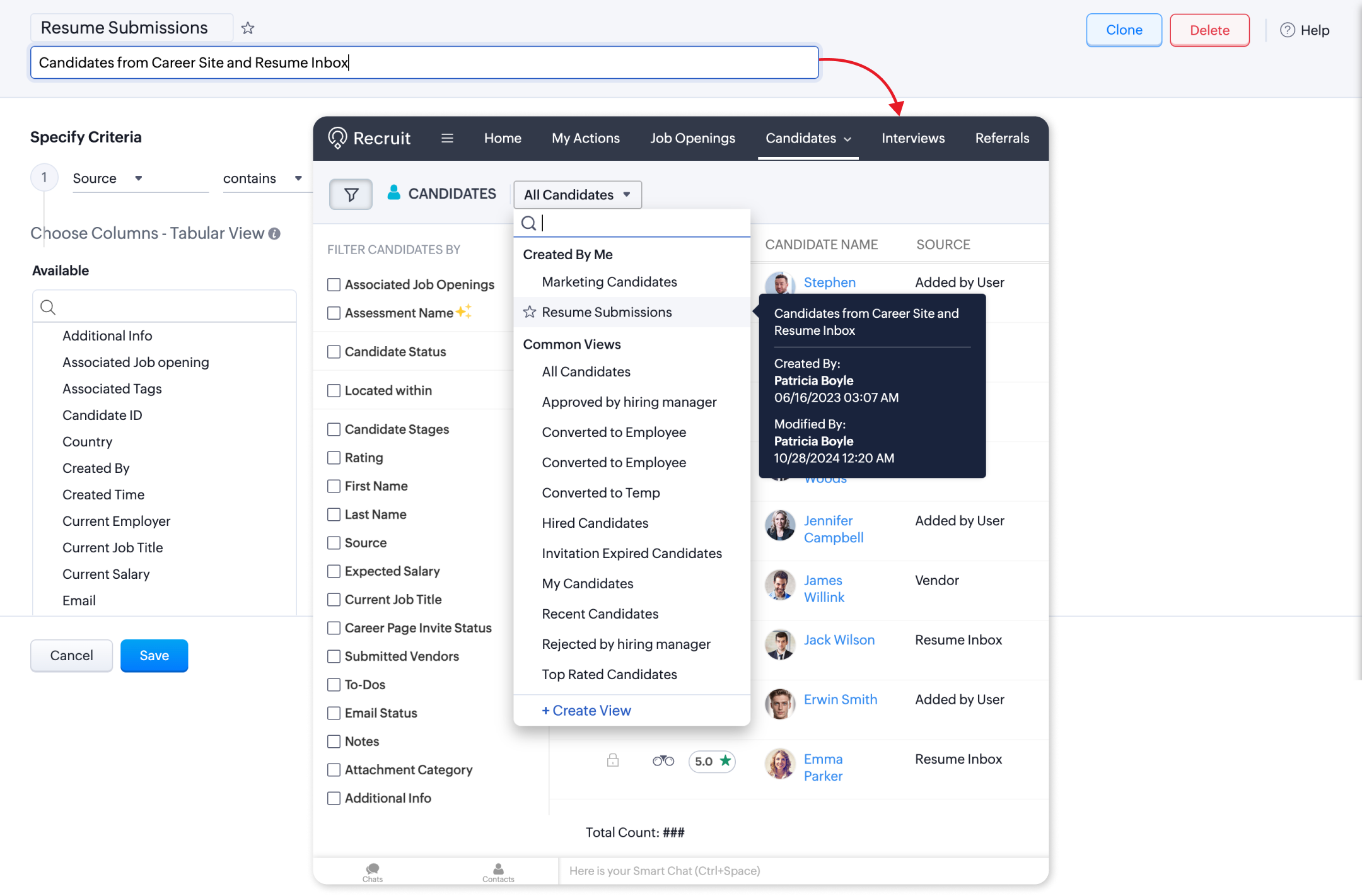
Lock Custom Views
With the new Lock Custom View option, users with the necessary permissions can secure a view to prevent unauthorized changes. Once locked, only designated users, such as administrators, can modify its settings.
This feature is ideal for maintaining consistent views, such as tracking KPIs or ensuring shared departmental data remains accurate and standardized.
Related Articles
Introducing Zoho Service Plus : A unified platform for customer service - Early Access for Partners
We are excited to announce early access to Zoho Service Plus, a unified platform that brings together all of our customer service applications into a single platform. The early access program is exclusive only to partners. With Service Plus, manage ...Import data from MS Teams to Zoho Cliq
Recently, Microsoft made a significant change to its MS Teams offering, discontinuing the Free Classic version. This has left many customers wondering what to do as a complete cut down of access for users under the free plan would mean total loss of ...How can you join/start scheduled meetings in Zoho Cliq - Android TV app?
Cliq's Android TV app will help you join meetings and start scheduled meetings from your TV. Let us see how you can sign in and use Cliq's features in the app. Download from Google Play Store: Go to Google Play store on your Android TV and search for ...Zoho Analytics: Product Updates - November 2023
Hello partners, We're excited to announce some key updates this month to improve your customers' BI experience. Here's a rundown of the new features. Advanced Analytics for Jotform Advanced Analytics for Jotform enables you to understand the ...Zoho CRM Android Refresh: Smarter Workflows with Kiosk and Multi-File Uploads
Hello everyone, Zoho shared some fresh updates to the Zoho CRM Android app that make your mobile CRM experience even more intuitive and productive. Let’s dive into what’s new! ? Kiosk: A Guided, No-Code Experience Kiosk is a powerful no-code feature ...