Zoho Bigin : Enhances Email Productivity with Microsoft Outlook Add-in
Hello Everyone,
Email remains one of the most effective channels for communicating with customers and potential clients. If you rely on Outlook.com for sending and receiving emails and use Bigin to manage your customer relationships, the Outlook Add-in allows you to connect both platforms seamlessly. This integration enables you to access Bigin contact information directly within Outlook.com. If an email arrives from someone who is not yet saved in Bigin, you can quickly create a new contact without leaving your inbox.
With the Outlook Add-in, you can:
- View relevant Bigin details such as pipeline records, scheduled activities, notes, and other related information without switching away from Outlook.
- Create new contacts in Bigin directly from your Outlook inbox.
- Add notes or schedule follow-up activities connected to your Bigin contacts.
For example, imagine you receive an email from someone asking about your services or product pricing. With this integration enabled, you can immediately verify whether the sender’s email address already exists as a contact in Bigin.
If the sender is not yet listed in Bigin, you can add them as a new contact within seconds.

- If the contact already exists, you can instantly view their profile information, associated pipelines, and previous notes directly inside Outlook.
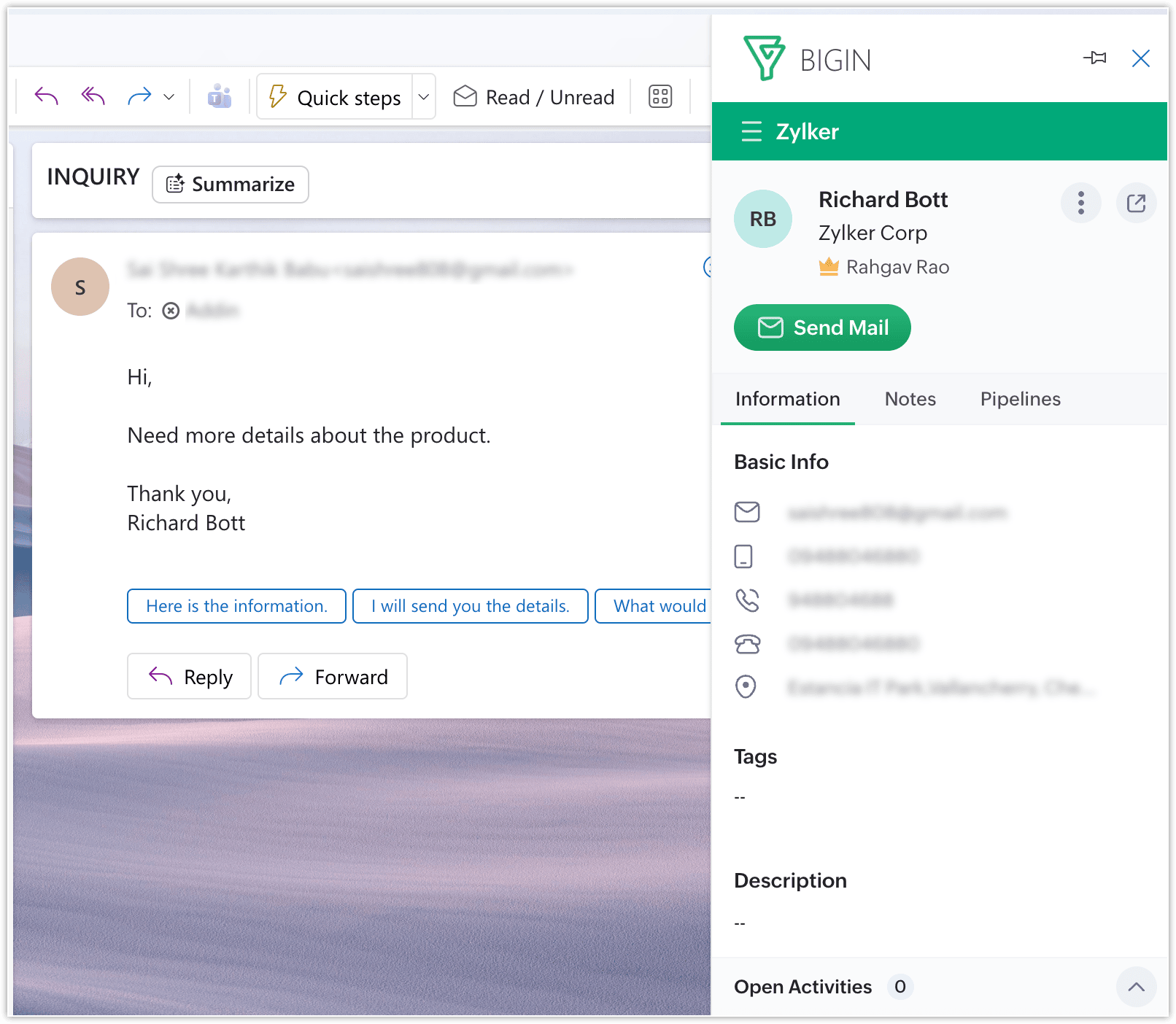
You can also modify their contact details or record additional notes regarding their inquiry without needing to switch between multiple tools.

You also have the ability to update pipeline stages directly from Outlook and view the available deals and pipelines associated with that contact.


Note:
- Editing a contact’s details will only be possible if your Bigin user profile includes the required permissions.
That’s everything included in this update! We hope the Outlook add-in helps simplify your email management and improves how you track conversations with customers. Give it a try and let us know your thoughts in the comments. More updates will be coming soon!
The Bigin for Email Outlook add-in is now available and can be installed directly from the Microsoft Marketplace.
For more information, please visit www.pfc-group.com.
Related Articles
Zoho Bigin: Streamline data collection with Bigin's new form builder.
We are excited to introduce Forms: an online form builder designed to meet all your data collection need. This revamp was inspired by your feedback, resulting in an upgraded and versatile version of web forms. So, what has changed? Forms for ...Zoho CRM: The Canvas Record Form for Enhanced Customization
Zoho announced Zoho Crm innovation with Canvas functionality now extends to record forms, enabling you to personalize record entries with the power of Canvas! Enhancing CRM Interactions with CanvasIn the heart of any CRM lies the ability to manage ...Zoho CRM : Compliance Made Easy for Email Authentication
We are introducing you with significant updates to enhance email authentication and verification processes across Zoho CRM and other Zoho services. These changes aim to bolster security, ensure compliance with industry standards, and improve user ...Introducing Zoho Service Plus : A unified platform for customer service - Early Access for Partners
We are excited to announce early access to Zoho Service Plus, a unified platform that brings together all of our customer service applications into a single platform. The early access program is exclusive only to partners. With Service Plus, manage ...ZOHO CRM - Enhanced CRM Functionality with Custom Email Fields
In response to the diverse communication needs of modern businesses, we are introducing you with enhanced support for custom email fields in our CRM system. This feature addresses the common scenario where individuals maintain multiple email ...